
Q: How do I post an empty leg?
A: You can post an empty leg under the Flights tab of your account; however, these will only show up on your website and be sent to your subscribers provided you have the web apps installed and are on our Professional subscription or higher.
Q: Why are our empty legs are not being imported to Air Mail?
A: Manually added empty legs do not go to Air Mail automatically, if you click AirMail checkbox and hit Send button it should appear on Air Mail today ( they have a delay sometimes 1h+ ).

Q: Is there any easy way to remove posts from Air Mail?
A: Unfortunately, once something is sent to the NBAA Charter Availability forum either through our system or directly, the post cannot be removed using our system.
You may be able to remove the post from the forum by logging into NBAA Air Mail and removing it directly from the announcement list.
Q: Can I un-send a trip inquiry or other requests in FlyEasy?
A: You cannot. Once sent out there is not a way for us to reverse the inquiry.
Q: How can I edit passenger info?
A: If you are referring to an existing passenger in quote in Trip Maker you can click on it in your list of passengers and it will open a dialog where you can edit details and hit save.
Q: How do I post an empty leg that I own?
A: You can key the empty leg into the FlyEasy dashboard by logging in to your account and clicking the Flights tab, then adding the empty leg under the Empty Legs tab in the view.
Your empty leg will show directly on your website and be added to the email campaigns that are automatically sent to your subscribers based on their preferences.
Q: Who is authorized to make changes on a FlyEasy account?
A: The user/email address attached to the FE account profile. If not specidied in FlyEasy, cross reference Tuvoli and then SalesForce. If the user cannot be confirmed via those platforms, reach out to Sales.
Q: Is there a way for me to filter leads based on their requested city preferences?
A: Yes, you can find the filter under the Prospects & Campaigns tab at the top left under "Web leads". The filter is by default set to Airport or City; however, you can also filter the web leads by Name/Email.
Q: Is there a way to price a minimum cost per leg?
A: We could use Minimum hours per day setting or Minimum daily rate $ setting for empty leg import pricing. These settings will affect one-way and round trip pricing, is that ok? If this is ok, I can add minimum hours/daily rate logic into their empty leg import pricing.
Q: I have checked on both the accounts and they both have the logo uploaded but it still won’t show on our trip sheets… Any help appreciated!
A #1: Essentially, your company logo will only display on your quotes/trip sheets that were created after your logo was uploaded into Fly Easy. Any quotes/trip sheets that were created before the uploading of your logo will not display the logo. To test this, I created a fictitious trip this morning and your logo appeared on the trip sheet. If you would like for your logo to appear on the trip sheet that you shared with us, then the trip would have to be "recreated" in Fly Easy.
A #2: The customer had their logo uploaded in PDF format which is not a valid format for images. I converted it to a JPEG and reuploaded and fixed references to this logo in their Trip Maker records, so the quotes and trip sheets should be showing the logo now.
Q: Need some help with the Virtual Fleet tool which I've not played around with for a little while. Trying to understand what the "Minimum Daily Rate differs from.." and what value I should be putting there.
How do I suppress this?
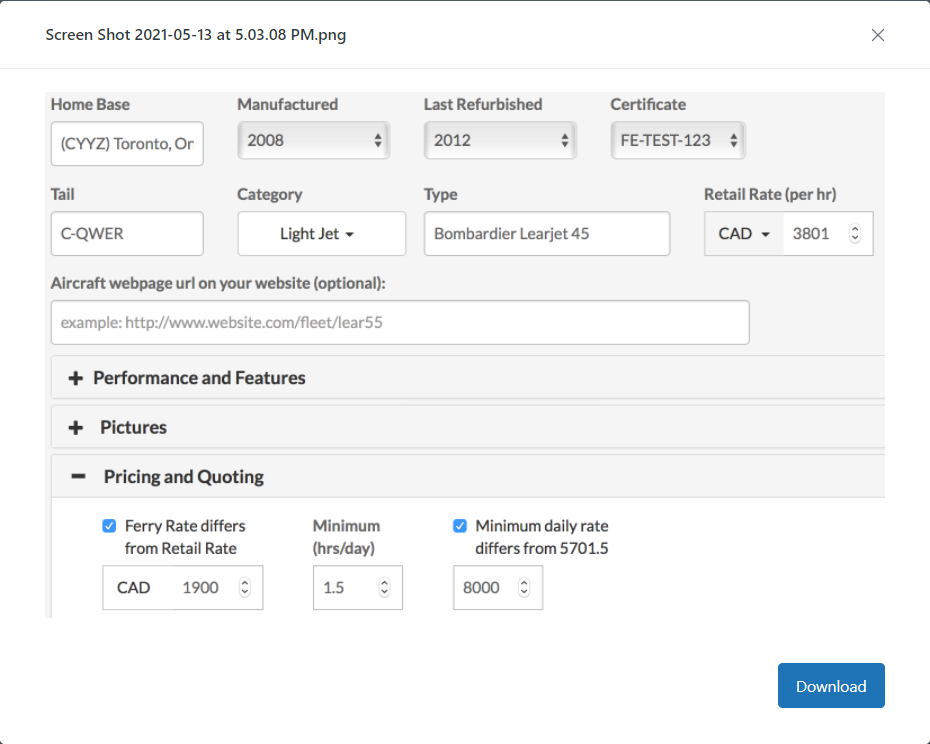
A: The pricing input field you are referring to allows you to set a minimum daily rate that is different from the retail rate specified. This value requires the minimum hours to be set.
For example, in the screenshot the minimums are set to 1.5 hrs/day. The retail rate is $3,801 thus the minimums that would apply for flight times less than 1.5 hrs/day would be $3,801 x 1.5 hrs = $5,701.50. The field you are referring to allows you to override this default value using the retail rate with a rate you specify.
To disable this functionality, simply uncheck the checkbox related to the field and the system will use the retail rate by default provided a minimum value is set.
Q: Could you please help me find out if we are already registered with you and if yes can we get user id and password for the log in?
A: It looks like your current credentials are associated with (email address) . Anyone with access to that email inbox can log in or initiate a password reset at flyeasy.co . Please let us know if you require any additional assistance.
Q: How are the AM Lead Feed results sorted?
A; The previous iteration of Air Mail we had was sorting by freshest posts at the top and this is still the case if a date was not provided in the filter. When a date is provided in the filter, the posts are sorted by the filtered date.
Q: How do I link my NBAA account w Fly Easy?
A: To link your NBAA account with FlyEasy, login to your FlyEasy account and select the Account tab on the left side of screen. Once the menu opens, scroll down until you see NBAA Airmail Charter Availability Integration. Here you will find a text field to enter your email to receive notifications, and then click SAVE.
You also need to adjust your Airmail Listserv Subscriptions (attached example) within NBAA to avoid receiving duplicate notifications.
Q: Do I need membership to NBAA to utilize the airmail service on my FlyEasy account?
A: A NBAA membership is not needed to view and get leads from NBAA Air Mail. However, if you want to post to Air Mail, you’ll need a membership.
Q: How do I cancel my FE subscription.
A: Email cancellation request to info@flyeasy.co. You must give 30 days notice.

Q: Why are my Trip Sheets in Tripmaker taking so long to download (PDF rendering)?
A: There is a good chance the image being used for your company logo resoluton is high enough to lengthen the amount of time it takes to process. Reducing the resolution should speed this up.
Q: Why can't I click on FlyEasy web widget buttons/icons on our company website?
A: It is possible your website is using layovers/backgrounds, and the placement of our widget coding is being blocked or having data lay over it. ie; you will need to place the web app code in the top layer rather than the bottom
Q: Can I have multiple logins for my FlyEasy account?
A: Yes, you can have multiple logins for a single FlyEasy account. However, you will have to speak to someone in our Sales department about additional costs associated with this request.
Q: What is the maximum number of time a Marketplace customer can source aircraft?
A: Max inquiries are limited to 12. Sales has secret a toggle to max them out before they reach 12 in cases where they see they are abusing the platform (i.e. creating multiple accounts when one of the maxes out).
Q: Can international needs/haves be posted in Air Mail?
A: You can post whatever you want in Air Mail. Most of the traffic on Air Mail is within North America though.
Q: How can I send out quite requests with a personal account?
A: Please login via sourcing.flyeasy.co to send out your Quote Request.
Q: I submitted multiple quote requests on Monday afternoon. Can you let me know where I would find any responses?
A: Quote requests get sent out to participating operators via email and operators will respond to the RFQ via email. The replies go to the email address setup with the requestor’s FlyEasy account. Please don't hesitate letting me know if this does not answer your question.
Q: Is there a way to repost a quote request without having to re enter all the info?
A: They would need to re-enter the itinerary. We don’t allow resending Quote Requests as they are not going to a public board like NBAA Air Mail, they are being emailed to each individual operator that was chosen in the search results and thus we need to protect operators from receiving duplicate requests.
Q: How do I update or change company information?
A: The customer can do that by going to their dashboard (blue Admin button - if they are in sourcing) and clicking on the Account tab. They can edit ALL of their company information from there, including the phone number.