
- What can I do in the Opportunity Manager Dashboard?
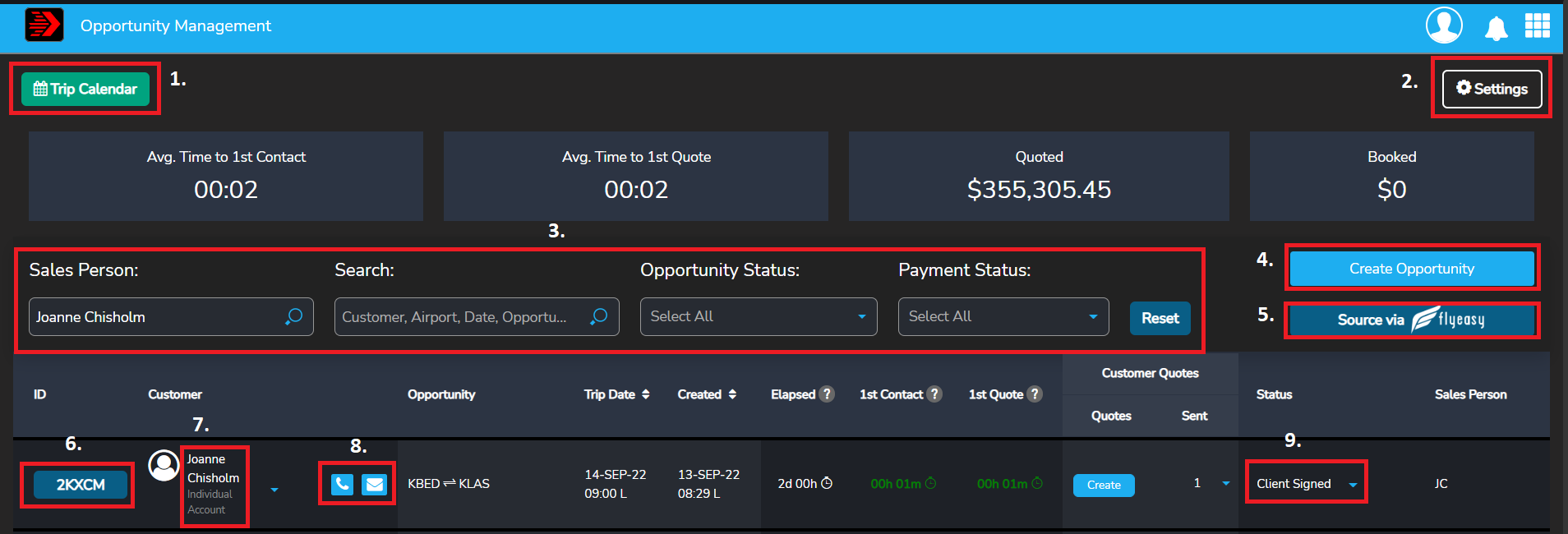
- 1. Trip Calendar
- Summary of all confirmed trips in a calendar view with payment status
- 2. Settings
- E-mail signature for outbound emails
- 3. Filtering options
- Search for an opportunity by sales person, customer name, airport, date, opportunity id or payment status
- 4. Create opportunity
- Create a new quote
- 5. Source via FlyEasy
- Search for available aircraft. This would be done prior to creating a quote.
- 6. Opportunity details
- Review, edit quote
- 7. Client information
- Review or edit client information
- Create new opportunity
- 8. Client communication (phone and email)
- Make notes on a phone call you had with your client (coming soon, capability to make phone call through the platform)
- Send an email to your client
- 9. Opportunity stages
- Contract signed
- Client signed
- Trip confirmed